Data Guide
Pressure matrix
Each frame uses a 63-row, 39-column matrix covering the five fingers and palm. Row and column indices start at 0. Rows increase downward and columns increase to the right.
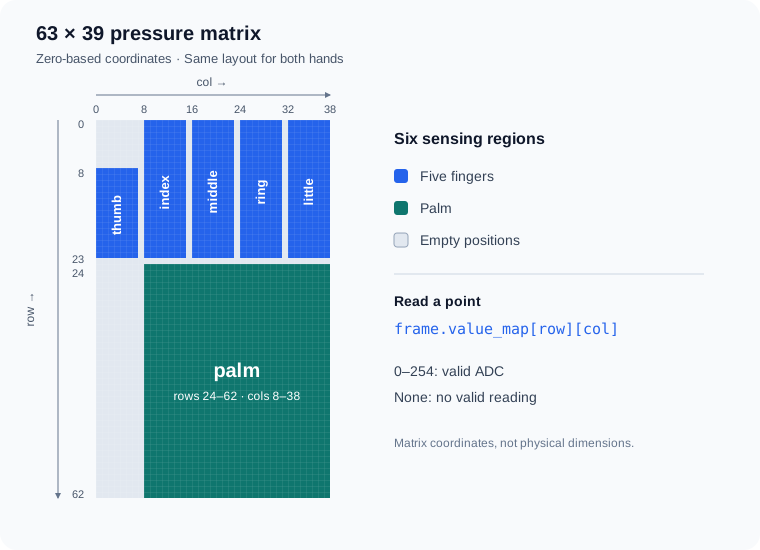
| Region name | Hand region | Row indices (inclusive) | Column indices (inclusive) |
|---|---|---|---|
thumb | Thumb | 8–22 | 0–6 |
index | Index finger | 0–22 | 8–14 |
middle | Middle finger | 0–22 | 16–22 |
ring | Ring finger | 0–22 | 24–30 |
little | Little finger | 0–22 | 32–38 |
palm | Palm | 24–62 | 8–38 |
The matrix contains 2457 positions. The six regions cover 1958 positions; the rest are empty. The number of valid points in a frame depends on the readings and is available through frame.valid_points(). Columns 15, 23, and 31 within the palm region are normal data positions.
Both hands use the same matrix coordinates. Use glove.info().hand to identify the device: 0 means right hand, 1 means left hand, and None means the device did not provide this information. Apply any display mirroring in your application.
Access readings
| Accessor | Data format | Invalid positions |
|---|---|---|
frame.value_map | A 63 × 39 nested list | None |
frame.values | A list of 2457 entries, ordered by row | None |
frame.get_point(row, col) | The integer reading at a specified position | None |
frame.data_bytes | A bytes object of length 2457, ordered by row | 255 |
Valid ADC values range from 0 to 254, including 0. Keep invalid positions separate from zero readings when calculating statistics or displaying a heatmap.
Convert a row and column to a one-dimensional index with:
index = row * 39 + col
Output modes
| Mode | Description |
|---|---|
adc | Filtered ADC data |
raw | Unfiltered ADC data |
tare_adc | Filtered ADC data with the tare result applied |
Set the mode with glove.set_output_mode(mode). Use data_cmd when reading to filter frames by that mode:
glove.set_output_mode("adc")
frame = glove.read_frame(data_cmd="adc")
data_cmd only filters the returned data. Call set_output_mode() first when you need to change the device's output.
Taring measures the zero offset while the glove is unloaded. glove.tare() performs this measurement and switches to tare_adc. Selecting tare_adc on its own uses the existing tare result. The result is not saved as permanent calibration.
Timestamps and sequence numbers
| Field | Description |
|---|---|
timestamp | Host Unix time when the SDK receives and parses the data, in seconds |
timestamp_ms | Device time in milliseconds, ranging from 0 to 4294967295 |
sequence | Device frame sequence number, ranging from 0 to 65535 |
Device time and sequence numbers wrap to 0 after reaching their maximum values. Sequence numbers read by your application may have gaps. Use timestamp together with sequence to identify new frames.
read_frame() returns the latest frame immediately when one is available. timeout controls how long to wait when no frame is available; it does not limit the age of an existing frame. Check timestamps to monitor whether data is still updating instead of relying solely on read timeouts.
Region statistics
frame.by_region() returns statistics for all (the entire hand), fingers (all five fingers), and palm. frame.by_finger() returns statistics for each of the five fingers.
| Field | Description |
|---|---|
count | Number of valid points, including positions with an ADC value of 0 |
total | Sum of valid ADC values |
max | Maximum valid ADC value |
mean | Mean of valid ADC values |
Statistics include only valid positions. All four fields are 0 when no valid readings are available. Contact thresholds do not affect these statistics. An ADC total does not directly represent a resultant force in newtons.
Contact points
frame.contacts(threshold=1) returns valid positions with ADC values greater than or equal to the threshold, sorted from highest to lowest. The threshold range is 0–255: 0 includes all valid positions, while 255 returns an empty list.
| Field | Description |
|---|---|
index | One-dimensional index in the full matrix |
row / col | Row and column coordinates |
value | ADC reading |
uv | Normalized coordinates [col / 38, row / 62] |
region | finger or palm |
finger | Finger name; an empty string for palm positions |
frame.contact_uv(threshold=1) returns [u, v] for the contact point with the highest reading, or None if no point meets the threshold. This is the location of one measurement point, not the center of pressure. Ties follow the region order in the matrix table above, then row order within each region.
Contact points represent individual measurement positions. One press can produce several adjacent points, so the number of contact points does not equal the number of separate presses.
IMU data
Devices with IMU support can provide three-axis acceleration and angular velocity. frame.gyro contains the IMU sample attached to that pressure frame, or None if there is no attached sample. You can also read IMU samples separately with glove.read_gyro().
| Field | Conversion or description |
|---|---|
acc_x / acc_y / acc_z | Divide by 100 to obtain acceleration in g |
gyro_x / gyro_y / gyro_z | Divide by 10 to obtain angular velocity in °/s |
timestamp_ms | Device time in milliseconds, or None if unavailable |
sequence | Frame sequence number, or None if unavailable |
source | Data source: serial or ble |
Read and convert a sample using a connected glove:
sample = glove.read_gyro(timeout=1.0)
acceleration_g = (sample.acc_x / 100, sample.acc_y / 100, sample.acc_z / 100)
angular_velocity_dps = (
    sample.gyro_x / 10,
    sample.gyro_y / 10,
    sample.gyro_z / 10,
)
print(acceleration_g, angular_velocity_dps)
Separately read IMU samples are removed from the pending list after reading. This does not affect pressure frame reads. See the API Reference for reading options.
Export data
Convert a frame to a dictionary and save it as JSON:
import json

with open("glove-frame.json", "w", encoding="utf-8") as output:
    json.dump(frame.to_dict(), output, ensure_ascii=False, indent=2)
The dictionary contains serial_number, timestamp, timestamp_ms, sequence, mode, rows, cols, values, and gyro. Invalid positions are represented as null in JSON. Save region statistics and contact results separately if needed.