Installation and Requirements
GripperGUI uses the same base environment as Xense Studio: 64-bit Windows 10+ or Ubuntu 20.04+. At least 16 GB of RAM and an NVIDIA driver are recommended.
Run the Windows installer or install the Linux package:
sudo dpkg -i /path/to/XenseGripper_v<version>.deb
Refer to the official website for downloads.
Components are initialized on the first launch. If no gripper is discovered, confirm that the computer and compute unit are on the same LAN, then click Change to discover and select the compute unit again. If the compute unit is selected but a connected tactile sensor is not found, click Reset Connection to scan for sensors again.
GripperGUIGet the Windows installer or Ubuntu package.
Open download page ↗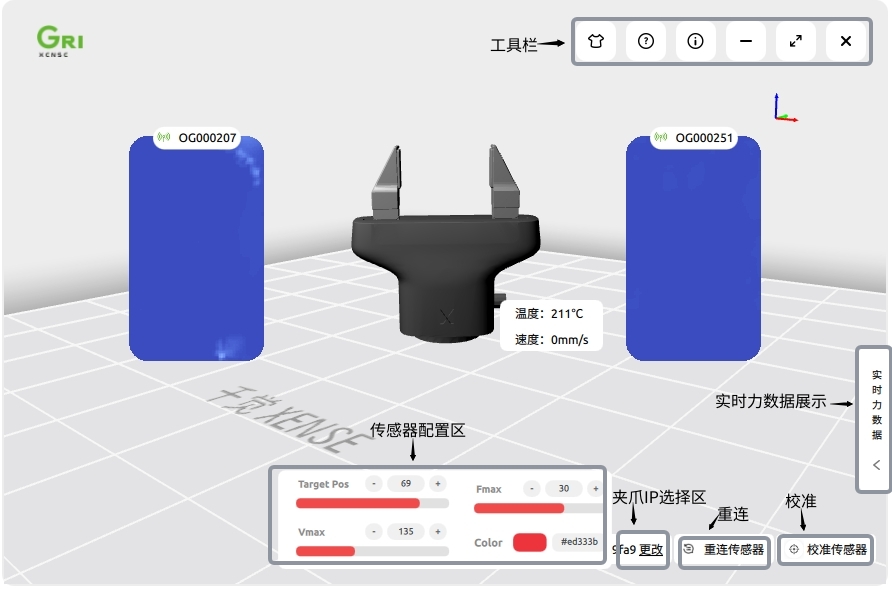
Software Updates
The GripperGUI update method depends on the installed version:
| Current version | Update method | Required action |
|---|---|---|
| Earlier than 2.0.2 | Full-package update | Exit the application after download, remove the old version, and install the new package. |
| 2.0.2 and later | Incremental update | Confirm the update; the application downloads and installs the incremental package automatically. |